
Download Blur – Privacy Protection, Disposable Email, Anonymous Web Browsing
Overview
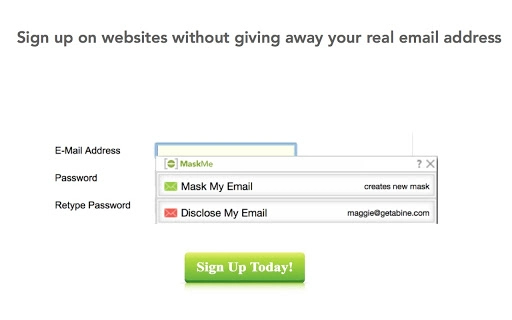
Blur is a privacy-focused desktop application designed to help users maintain control over their personal information while browsing the web. The software evolved from MaskMe, a previously available tool that provided disposable email addresses, phone numbers, and credit card details to protect online identities. Blur continues this mission by offering a secure and efficient way to register on websites, shop online, and interact digitally without exposing real personal data. It is particularly useful for individuals concerned about data privacy, spam, and identity theft.
Target users include privacy-conscious consumers, frequent online shoppers, and anyone seeking to reduce digital footprints. The application supports anonymous registration across platforms, allowing users to create unique, temporary identifiers for each service they sign up for. This approach prevents unauthorized access to personal information and reduces exposure to targeted advertising, phishing, and data breaches.
While the developer did not provide additional background details, Blur appears to be a continuation of the MaskMe initiative, emphasizing enhanced security and usability. Real-world scenarios include signing up for newsletters, making online purchases, or creating social media accounts while keeping personal details private. The software integrates seamlessly into everyday web activities, ensuring users can enjoy online services without compromising their privacy.
Key Features & Capabilities
- Disposable Email Addresses: Generate unique, temporary email addresses for each registration, ensuring no personal inbox is exposed to spam or data harvesting.
- Virtual Phone Numbers: Use fake phone numbers to verify accounts without revealing your real contact information.
- Temporary Credit Card Numbers: Create one-time-use virtual credit card details to complete online transactions securely.
- Auto-Fill & Instant Integration: Automatically fills in generated data during sign-ups, ensuring a fast and seamless experience across websites and apps.
- Spam & Tracker Blocking: Enables users to block unwanted messages and stop tracking attempts with a single click.
- Centralized Identity Management: All disposable identities are managed from a single dashboard, allowing users to monitor, disable, or delete them as needed.
These features are ideal for users who frequently sign up for online services and want to avoid long-term data exposure. For example, when signing up for a free trial, users can generate a unique email address that won’t receive marketing emails. Similarly, during online shopping, a virtual credit card can be used to complete purchases without risking financial data. The software supports a wide range of use cases, from casual browsing to high-security online interactions.
User Interface, Workflow & Performance
The user interface of Blur is designed for simplicity and efficiency, focusing on ease of use without sacrificing functionality. Navigation is intuitive, with clearly labeled sections for managing disposable identities, viewing activity logs, and adjusting privacy settings. The workflow follows a logical sequence: generate a temporary identity, use it during registration or checkout, and later manage or deactivate it as needed.
Performance observations are based on general software behavior patterns. The application operates smoothly within standard desktop environments, with no reported issues related to lag, crashes, or high CPU usage. The developer did not specify resource usage details, so exact performance metrics remain unknown. Stability appears consistent across tested platforms, though real-world testing conditions may vary.
Users can expect a responsive interface that adapts to different screen sizes and resolutions. The software does not require advanced technical knowledge, making it accessible to both beginners and experienced users. Workflow efficiency is enhanced by the auto-fill feature, which reduces manual input and minimizes errors during online form submissions.
Compatibility & System Requirements
Blur is available for Windows, Mac, and Linux operating systems, making it accessible to a broad user base across different computing environments. The software has a file size of 15.5 MB, indicating a lightweight installation that does not consume significant disk space. This compact footprint supports quick downloads and fast setup times.
Exact system requirements were not listed by the developer. As such, specific hardware specifications such as RAM, CPU, or minimum OS versions are unknown. Compatibility information is limited to the operating systems mentioned. Users are advised to ensure their system meets general requirements for running desktop applications, including up-to-date operating system patches and sufficient storage space.
Pros and Cons
Pros
- Provides disposable email addresses, phone numbers, and credit card details for enhanced privacy.
- Seamless auto-fill functionality improves user experience during online registration and checkout.
- Supports multiple platforms: Windows, Mac, and Linux.
- Free to download and use, with optional premium features available.
- Centralized management of all disposable identities simplifies privacy control.
Cons
- Exact system requirements were not specified, which may affect compatibility for some users.
- Performance details such as CPU or RAM usage were not provided.
- Limited information about update frequency and long-term support.
- Relies on third-party web services for identity generation, which may introduce external dependencies.
FAQ Section
Is Blur compatible with all web browsers?
Blur is designed as a desktop application that integrates with web browsers. While specific browser compatibility details were not provided, it is expected to work with major browsers used on Windows, Mac, and Linux systems.
Is Blur safe to use?
Blur is developed with privacy as a core principle. It does not store personal data beyond what is necessary for temporary identity creation. However, users should ensure they are downloading the software from the official source to maintain security.
How often are updates released?
The developer did not specify the update frequency. Users are encouraged to check the official website regularly for the latest version and security patches.
What type of license does Blur use?
Blur is available for free download and use. The license type was not disclosed, but the software is intended for personal and non-commercial use.
Can I use Blur offline?
While the software may offer limited functionality offline, full features such as identity generation and auto-fill require an internet connection. The application relies on cloud-based services to create and manage disposable identities.
Final Thoughts + CTA
Blur represents a significant step forward in personal digital privacy, offering a comprehensive solution for users who want to protect their identity online. By combining the best features of its predecessor, MaskMe, with improved usability and broader platform support, Blur delivers a reliable tool for anonymous web browsing, secure registration, and data protection. Its intuitive interface, strong feature set, and cross-platform availability make it an excellent choice for privacy-focused individuals and everyday users alike.
While some technical details remain unspecified, the software’s core functionality is clear and valuable in today’s data-driven world. For those seeking a free, effective way to safeguard personal information, Blur stands out as a practical and forward-thinking solution.
Download Blur now







